
High School Skill Sequence and Boost-It Sessions
We have adjusted the high school skill sequence to facilitate better progress for your high school students. If your class had already mastered Mixed Operations, then you continued without any change. If your class was stuck on Mixed Operations, we moved your class to addition within a new sequence that begins with addition, then subtraction, then multiplication, and finally division before continuing through the high school sequence. This change was in place in early January as students returned to school. The high school Boost-It sessions are extremely helpful and use interleaved practice/cumulative review during the week to facilitate stronger gains for high school students.
Enhancements to the Coach Dashboard
You have probably noticed some changes to your coach dashboard. These changes are intended to make it easier for coaches to know how to support teachers each week. These changes are in progress and you can expect to see more in the coming weeks and months, all of which are designed to help you know which actions to take and to take those actions with greater ease.
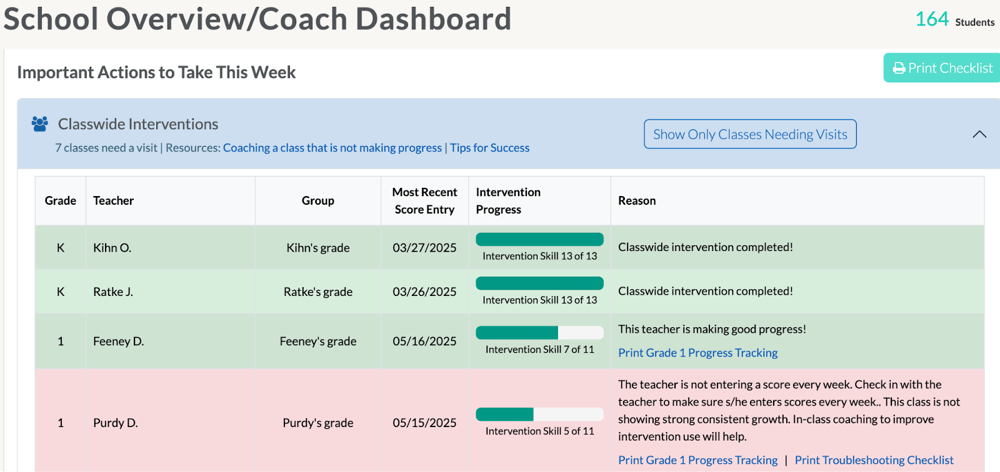
On your School Overview page, if a row is shaded pink, that means that class needs your help. If the row is shaded green, the class is doing great and does not need help this week. We tell you what help is needed and give you a resource to guide you right in the last column.
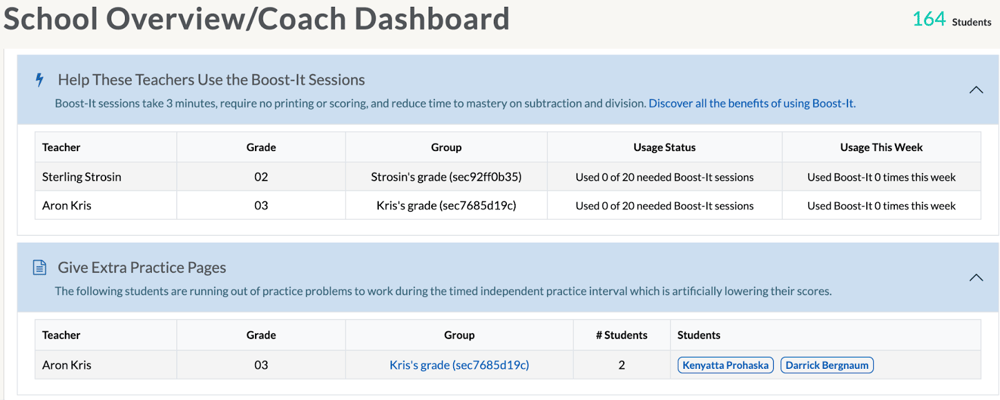
Just under classwide intervention, we tell you which teachers could use some encouragement to use the Boost-It sessions. We also tell you which teachers have students running out of practice problems to work during the timed practice interval in classwide intervention. These teachers should simply give those students an extra page so all students can work the entire interval and get credit for every problem they correctly complete before the time is up.
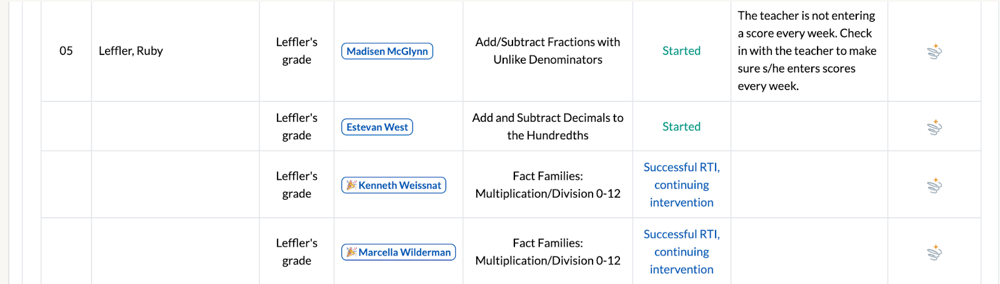
Under Individual Interventions, we tell you which students have been recommended for individual intervention, which have started individual intervention, and which students have had a successful RTI. We tell you in the last column whether we (SpringMath) recommended individual intervention or the coach assigned the individual intervention for the student. We also tell you what skill students are working on, whether or not they are part of a small group, and whether the intervention is being implemented well or could benefit from some in-class coaching support.

Look for similar changes to appear on the grade-level tabs in the coach dashboard and in the teacher dashboard in the coming weeks. As we release these updates, we will notify you in SpringMath. We hope you like them! Reach out to us if you have any questions or feedback for us.