Winter Screening
The winter screening window is from January 1 through March 31. While teachers can administer the screeners at any point during this time, we suggest that administrators establish a shorter, 2–3 week district window within the full period.
What happens after winter screening?
After completing your Winter Screening, SpringMath may recommend new classwide or individual interventions, similar to the recommendations made in the fall.
Classwide Interventions:
If your class is already engaged in a classwide intervention, you will simply continue with your current intervention and proceed through the sequence. Classwide interventions are designed to cover the entire year.
Individual Interventions:
Students who are already in individual intervention will continue until they meet their fall goals. Once they complete those, the winter screener results may prompt new goal skills. The system will also update the list of all students recommended for individual interventions based on those fresh screening results.
Seasonal Growth:
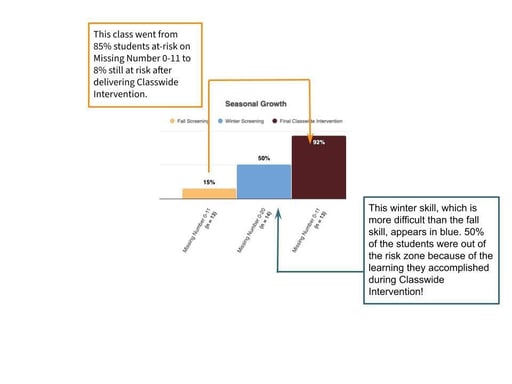
A blue bar representing winter screening scores will be added to the Seasonal Growth charts. Teachers can find this on the Growth tab. Coaches can see these data for a grade level by clicking on the grade level on the blue navigation bar on the left of the screen.
When viewing the Seasonal Growth chart, first look at the yellow and brown columns. The yellow bar shows the percentage of students not in the at-risk range on that skill during fall screening. The brown bar shows the percentage of students not in the at-risk range once classwide intervention finished on that same skill. You will likely see very nice growth there!
When winter screening scores are added, a blue bar will populate. The winter screening skills are related to the fall skills but are more difficult. When you see higher scores for this more difficult skill, you know the students are learning!